Support for the Orbit Visualisation Tool (OVT) Support for the Orbit Visualisation Tool (OVT)
Introduction
This web page gives access to updates of various data files needed by
the Orbit Visualisation Tool for Cluster,
which has been developed by the Swedish Institute for Space
Physics, Uppsala and ESA.
The OVT code (currently version 3.0)
and documentation are
available from the OVT web site.
IMPORTANT OVT v3 PATCH. Version 3.0 of OVT was updated in November 2022 to add support for GEI (J2000.0) and GEI (epoch-of-date) coordinate systems. This enables OVT to correct satellite positions for the precession of Earth's rotation axis and thus give more accurate spacecraft positions in coordinate systems, such as GSE and GSM, used in scientific analyses. This update takes the form of a patch to version 3.0, rather than an installation of a complete new release. See the OVT User Guide for instructions on how to patch an existing installation of OVT version 3.0. The updated OVT will display "Orbit Visualization Tool V3.0 (Build 10)" in the upper bar of the OVT main window (rather than Build 7 for the original 2016 release of version 3.0).
IMPORTANT: running OVT under macOS. OVT will run under macOS Sequoia which was released in September 2024. As noted in the OVT User Guide, OVT would not run under the older macOS Ventura (released October 2022) and required use of a suitable virtual machine as a workround.
IMPORTANT: Super-LTOF updates resumed 12 March 2025. The JSOC system has now been reconfigured so that the Super-LTOFs are automatically updated with latest predicted orbit data from ESOC.
Geomagnetic field
OVT supports the tracing of
magnetic field lines within the magnetosphere. This tracing is based on
various external and internal magnetic field models
including the
International Geomagnetic Reference Field (the current IGRF model is version 14, which includes
extrapolation of the modelled field to 2030). To update this field model in OVT:
Download the updated data file igrf.d
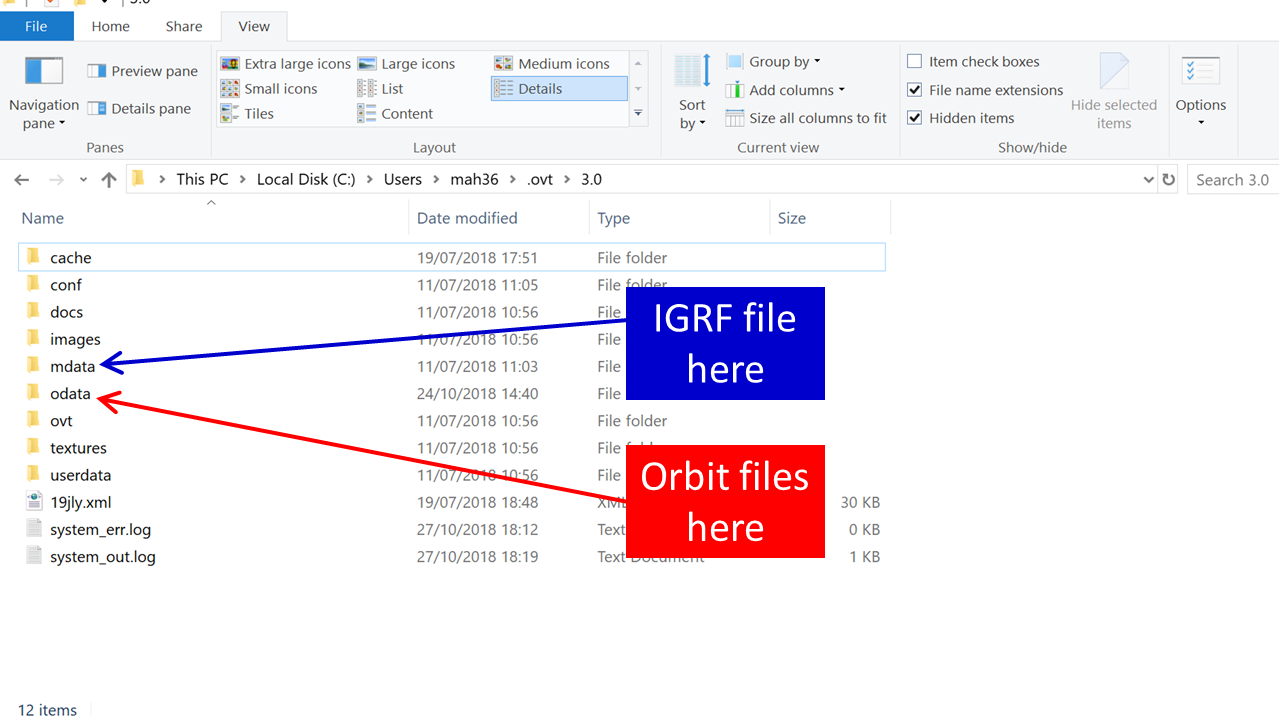
Go to the mdata directory
within your OVT installation (e.g. on a typical Windows 10 installation
this is C:\Users\XXX\.ovt\3.0\mdata),where XXX is your user name. See
figure below.
Rename the existing igrf.d file, e.g. as igrf_old.d
Copy the new igrf.d into the mdata directory
Re-start OVT to use the new file
Cluster orbit data
OVT can read the
Cluster orbit files provided by ESA. These files are available
from a variety of sources with varying lengths of time coverage. For comprehensive
coverage of the mission it is recommended to use the
Super-LTOF files
compiled by JSOC.
These cover the whole period from
launch to the end of mission.
Up to early October 2024, they were automatically updated weekly as new
reconstituted data for the past mission became available.
During that period they were also updated with new
predicted data as ESOC implemented the detailed plans developed by
the Cluster Science Operations Working
Group. Details of those updates are shown below.
ESOC ceased the production of reconstituted data in early October 2024, following the end of science operations on 30 September 2024, but continued to produce good predicted data on a weekly basis. The JSOC system has now (March 2025) been reconfigured to use these data to automatically update the Super-LTOFs. For more details see the notes below.
To check the provenance of any Cluster orbit file, please see the advice below.
Further release information.The bullet point list below provides a history of the major updates made to the Super-LTOFs
since 2009:
- The version available from 20 March 2009 to 7 May 2009 contained inaccurate data for December 2009 to December 2012.
- The version available
from 7 May 2009 contains accurate data for the period through to December 2012.
- This was extended to January 2015 in the version released
on 22 December 2009.
- A new version released on 26 March 2010 updates the orbits from 13 July 2009 through to January 2015.
- A new version released on 3 March 2011 updates the orbits from 20 July 2010 through to January 2015.
- A new version released on 28 October 2011 adds reconstituted data to 26 October 2011
and updates the predicted data through to 1 February 2017.
- A new version released on 12
December 2011 includes manoeuvres for the guest investigator formations
now planned for 2012 and early 2013
and other changes agreed at or following
the Nov 2011 SOWG at ESTEC. Orbits are then projected forward through
to 2 January 2017.
- A new version released on 11
September 2012 includes updates to manoeuvres for the Foullon and Pu
guest investigator formations planned for
November 2012 and February 2013. Orbits
are then projected forward through to 2 January 2017.
- A new version released on 20
March 2013 includes updates to manoeuvres to refine the close
configuration of C1, C3 and C4 in the inner magnetosphere during
August-September 2013 and a preliminary planning of the Pitout guest
investigator formation in November/December 2013. Orbits are then
projected forward through to 3 January 2017.
- A new version released on 21
June 2013 includes updates to manoeuvres to refine the Pitout guest
investigator formation in November/December 2013, to set up the ring
current formation in spring 2014, and a draft planning for the tail
formation in Autumn 2014. Orbits are then projected forward through to 3
January 2019.
- A new version released on 16
April 2014 includes changes from mid October 2014: (a) manoeuvres to a
repetition of the Pitout guest investigator formation in
October/November 2014, and(b) manoeuvres to set up a bow shock 5km
formation in January 2015 (lasting at least till mid February 2015).
Orbits are then projected forward by free drift propagation till end of
2019. The bow shock 5km formation 2015 is final for C3/C4. It might be
changed for either C1 or C2 by shifting one satellite backwards by up to
20 minutes (to be decided in September 2014 at the SWT in Rhodes).
- A new version released on 17 October 2014 includes changes decided at the September 2014 SWT in Rhodes.
- A new version released on 06 March
2016 includes changes implemented by ESOC in August 2015 and February
2016. It now includes orbit data to January 2022.
- A new version released on 24 March
2017 includes changes implemented by ESOC in 04 January 2017. It now
includes orbit data to January 2022.
- A new version released on 4 April 2018 includes orbit data now going up to Aug 2024 for C2 and end 2025 for C1, C3 and C4.
- A new version released on 7 August
2018 includes orbit data now going up to start of 2024. They cover the
solar wind monitor formation in Spring 2019 and the tail formation in
Autumn 2019. They include the manoeuvres planned for the associated
formation changes between November 2018 and August 2019.
- A new version released on 19th
February 2019 includes the LTOF files received from ESOC on 8th
February. In these ESOC FD has implemented the proposed shifts of 4h by
C1 and 1h by C3. The drift is started on 15th September 2019 and stopped
on 10th December followed by a trim manoeuvre on 19th December 2019.
- A new version released on 1st
August 2019 is unchanged up to 1st January 2024, but includes orbit data
now going up to 31st Aug 2024 for C2, 6th November 2025 for C1 and up
to 30th April 2026 for C3 and C4.
- A new version released on 15th
August 2019 includes formations for the north hemisphere cusp crossing
in Jan 2020, south hemisphere cusp in May 2020, looking at the sub-ion
magnetic holes in the dipolarized plasma sheet Aug/Sep 2020, and a study
of the magnetic reconnection at the Earth's magnetopause from end Nov
2020 onwards. Please note that the Aug/Sep 2020 formation implementation
is still to be confirmed.
- A new version released on 15th
October 2019 for Spacecraft 2 alone includes an update for manoeuvre
optimisation and orbit prediction for the C2 manoeuvres on 22nd
September and 13th November 2020. The new C2 LTEF/LTOF are practically
identical to the previous ones except during 22nd September - 22nd
November 2020 where the formation change manoeuvres take place. The
maximum time difference is between four and five minutes along track.
- A new version released on 17th
August 2020 for all spacecraft contains the 2021 manoeuvres for the hiss
formation starting in June 2021. This update was contained in the LTEF
and LTOF files received from ESOC on 7th August 2020. Manoeuvres to
reach the formation will be performed between 29th March 2021 and 11th
June 2021.
- A new version released on 4th
August 2021 for spacecraft 3 implements the formation in April 2022,
after the end of the short eclipse season, to measure the extent of high
speed plasma jets in the magnetosheath. As only the SC.3 position
changes along track, last years’ orbits of the other satellites remain
valid.
- A new version released on 18th
February 2022 for spacecraft 3 implements the magnetotail formation in
2022, for which C3 is shifted from 3000km distance to 1 Re from C4. As
only the SC.3 position changes, last years’ orbits of the other
satellites remain valid.
- A new version released on 13th
July 2022 based on long-term orbit files received from ESOC on 20th June
2022 for all spacecraft, implements the formation to enable the
campaign for studying the scale of foreshock bubbles in Spring 2023.
- A new version released on 13th
October 2022 based on long-term orbit files received from ESOC on 15th
September 2022, for spacecraft 1 and 2 only, implements both time shifts
for the auroral acceleration region campaign involving manoeuvres on
SC,1 and 2 up to 28th April 2023, and ending with a final trim manoeuvre
on SC.2 on 17th November 2023. For SC. s 3 and 4 the LTOFs from June
2022 already contained the 20km configuration required.
- A new version released on 7th
December 2022 is based on long-term orbit files received from ESOC on
25th November 2022, for spacecraft 1 and 2 only; corrects time shifts
for the auroral acceleration region campaign involving manoeuvres on
SC,1 and 2 in April 2023, and implements manoeuvres in September and
November 2023. For SC. s 3 and 4 the LTOFs from June 2022 already
contained the 20km configuration required.
- A new version released on 8th
November 2023 for spacecraft 2 is based on long-term orbit files received from ESOC for spacecraft 2 only on
28th September 2023; it takes into account the air drag effect during the last few months of the mission for spacecraft 2 and considers the re-entry tuning manoeuvres for it in January 2024 .
- A new version released on 22nd March 2024, for spacecraft 3 only, now includes the SC.3 reconfiguration in April 2024. This comprises of several manoeuvres to facilitate the Northern AAR formation.
However the differences wrt previous long term orbits from June 2022 are small; they remain below 25km radial/across track and less than 0.5 minutes along track during the whole year 2024.
- A new version released on 26th June 2024 for spacecraft 1 only, now includes the C1 re-entry tuning, involving two manoeuvres on 3rd August 2024 at 19:12z (main manoeuvre) and 10th August 2024 at 19:09z (trim manoeuvre).
- On 28 December 2024 the Super-LTOF for Cluster 2 was updated to include the latest orbit data through to its re-entry on 8 September 2024. This includes accurate predicted data for the final days of the spacecraft (1 to 8 September 2024).
- On 7 March 2025, the Super-LTOFs for Cluster 1, 3 and 4 were updated to include accurate predicted orbit data based on all STOFs and LTOFs received from ESOC since October 2024. Predicted data starts 4 October 2025 for Cluster 1, and 7 October 2025 for Cluster 3 and Cluster 4.
- The automatic updating of the Super-LTOFs for Cluster 1, 3 and 4 resumed on 12 March 2025 and is expected to continue on a roughly weekly basis as ESOC release new STOFs.
To update the Cluster orbit data in OVT, first download the updated orbit (SuperLTOF) files:
Cluster1.ltof
Cluster2.ltof
Cluster3.ltof
Cluster4.ltof
Then go to the odata directory
within your OVT installation (e.g. on a typical Windows installation
this is C:\Users\XXX\.ovt\3.0\odata),where XXX is your user name. See
figure below.
.
Rename the existing orbit files, e.g. as Old_cluster1.ltof
Copy the new orbit files into the odata directory
Re-start OVT to use the new file
Double Star orbit data
Double Star orbit are also
available as Super-LTOF files. To update these orbit data in OVT, first
download the updated orbit files:
Double_Star_1.ltof (26 Mbytes)
Double_Star_2.ltof (32 Mbytes)
Then proceed as for Cluster orbit files
Checking the provenance of Cluster & Double Star orbit files
The Cluster & Double Star orbit files are divided into blocks where each block
specifies the spacecraft orbit for a particular period. Thus each orbit file is built
up of contiguous blocks in order to cover an extended period.
Each block is labelled with a data type (R for reconstituted and P for predicted) and
a generation time; these can be used as an indication of the provenance of
the orbit data.
To generate a list of orbit block provenance records, you may use the Unix script
orbit_block_list.
This takes the orbit file name
as its only argument and lists records
to standard output. Each record gives a data type,
generation time and the range of times
covered by blocks with that provenance; this range will generally be
more than one block.
This script runs under Solaris so you may need to adapt for other systems.
Swarm orbit data
The ESA Earth Explorer mission Swarm was launched on 22 November 2013.
It aims to provide the best ever survey of the geomagnetic field and its temporal evolution and to gain new insights about the Earth's interior and climate.
The Swarm mission is a constellation of three satellites in polar orbits, with two (A and C) in similar close orbits with initial altitude around 460 km and the third (B)
in a different orbit with initial altitude around 530 km.
High-precision and high-resolution measurements of the strength and direction of the magnetic field are provided by each of 3 Swarm satellites.
In combination, these magnetometers provide the observations that are required to model various sources of the geomagnetic field.
GPS receivers, an accelerometer and an electric field instrument on each spcecraft provide supplementary information for these studies.
The Swarm data are available via ESA's Swarm Data Access page.
Swarm also monitors the time-variability aspects of the geomagnetic field producing results that also have practical applications in areas such as space weather and radiation hazards.
Data from Swarm are therefore of great interest to the solar-terrestrial physics (STP) community, especially if they can be combined with data from other STP instruments,
such as those from Cluster. In order to do this, it is necessary to identify when Cluster and Swarm can make coordinated observations,
e.g. when the two missions are observing in magnetically conjugate locations.
The Swarm orbit can be plotted with OVT which has access to the orbits of the heliophysics spacecraft through SSCweb .
Other mission orbit data
OVT can also read orbit data in the
NORAD Two-Line Element (TLE) format. This is the recommended method by which OVT can
ingest and display orbit data for other magnetospheric missions, e.g. Polar, THEMIS. A number
of historical TLE datasets are available as part of the OVT installation kit. Additional
TLE data are available from a number of sources:
The official source of Two-Line Elements is the
Space Track web site run by the US Air Force. This requires a username/password for login and
the downloaded data are provided for your personal use only. Thus you are recommended to
apply for a personal account via the Space Track web site above.
Historical (1957-2004) elements are freely available via the
Celestrak web site together with a small amount of
more recent data. This web site also provides extensive information on the history and use of
Two-Line Elements.
To update other orbit data in OVT:
Obtain the Two-Line Elements as described above.
Go to the odata directory
within your OVT installation (e.g. on a typical Windows installation
this is C:\Users\XXX\.ovt\3.0\mdata),where XXX is your user name. See
figure below.
Place the new TLE file in the odata directory with name xxxx.tle, where xxxx is a suitable description (no blanks)
Re-start OVT to use the new file
Caveat: Experience shows that OVT has problems in using some TLE datasets. These are being
investigated. Possible sources of problems are:
Missing checksums in TLE records - causes a read error in OVT
Large time gaps between TLE records
OVT directory structure and file installation
The figure below shows the standard OVT directory structure and
the location of the odata and mdata directories in which the files
above should be installed.
Important note: If you cannot save files
directly from the web page to the relevant directory, it may be that you
need to administrator privilege to load
files into these directories. If so it is recommended
to save the files to an intermediate directory, then copy from there to
the directories shown below,
confirming/supplying administrator privilege when
prompted.

Last updated by Anne
Chadwick ( anne.chadwick@stfc.ac.uk), Yulia
Bogdanova ( yulia.bogdanova@stfc.ac.uk) and Mike
Hapgood ( mike.hapgood@stfc.ac.uk)
13th March 2025.
|